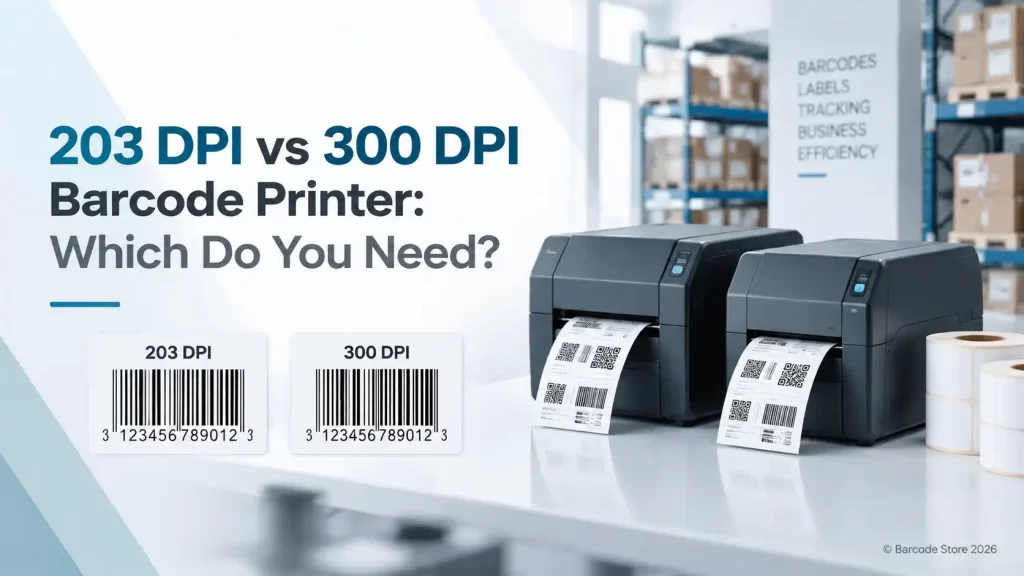
A label may look fine on screen but fail at the scanner if the printer resolution is wrong for its size. That is the practical issue behind choosing a 203 vs 300 dpi barcode printer, not a question of buying the more expensive option by default.
For most carton labels, shipping labels, pallet labels and standard retail barcode labels, 203 DPI is the sensible choice. Move to 300 DPI when labels carry very small text, compact QR or Data Matrix codes, small jewellery or product labels, or detailed graphics. Higher resolution gives finer print detail; it does not automatically make every label more readable.
A 300 DPI printer is often the right answer for a small label. For a large warehouse label, it can be money and speed spent where it is not needed.
What DPI means on a barcode printer
DPI means dots per inch. A thermal printer creates each letter, line and barcode bar from tiny heated dots on the printhead. A 203 dpi barcode printer places 203 dots across every inch of print width. A 300 dpi barcode printer places 300 smaller dots into that same inch.
More dots give the printer more room to reproduce fine detail. Small fonts have smoother edges, narrow barcode elements can be drawn more accurately, and dense 2D codes hold their shape better. This is particularly useful where the label itself is physically small.
DPI is only one part of barcode readability. Label material, ribbon selection, print darkness, print speed, barcode size, scanner quality and damage after application all matter. A sharply printed code on a poor paper label can still become unreadable after rubbing against pallet wrap or condensation in a Dubai cold-room.
203 DPI vs 300 DPI barcode printer comparison
| Factor | 203 DPI | 300 DPI |
|---|---|---|
| Best suited label types | Shipping, carton, pallet, warehouse and standard product labels | Small product labels, laboratory labels, jewellery tags, healthcare labels and detailed compliance labels |
| Small text | Comfortable for normal text sizes; very small text may look rough | Better definition for small fonts and fine characters |
| 1D barcodes | Works well for ordinary-sized Code 128, EAN and similar barcodes | Useful for very narrow or dense 1D symbols |
| 2D codes | Suitable where the QR or Data Matrix code has enough physical space | Better for compact, information-dense QR and Data Matrix codes |
| Print speed | Often faster, depending on the printer model and label design | May run more slowly, particularly on detailed print jobs |
| Typical buying position | Practical default for general label operations | Specialist choice where fine print genuinely matters |
The difference is easiest to see with small type. A 5 mm-high warehouse location label with a large Code 128 barcode is normally comfortable at 203 DPI. A 20 mm-wide medicine vial label containing patient details, a batch reference and a compact Data Matrix code is a very different job. At that scale, 300 DPI is usually the safer decision.
Where a 203 DPI label printer makes sense
A 203 dpi label printer is the workhorse choice for many businesses. It suits operations that need clear, reliable labels rather than miniature printing. In a warehouse, the priority is commonly a barcode that scans quickly from a reasonable distance, with large human-readable text for pickers and receiving teams.
For standard labels, 203 DPI has practical advantages. The printhead has fewer dots to fire, so printers at this resolution commonly support faster output than comparable 300 DPI versions. It is also a natural fit where the label artwork does not need fine detail.
Good 203 DPI applications
- Courier, dispatch and shipping labels
- Carton and pallet identification labels
- Warehouse bin, rack and location labels
- Standard retail price and product labels
- Asset labels with normal-sized text and barcodes
- Food preparation, date and batch labels with clear large type
A distributor in Jebel Ali printing carton labels all day should normally start at 203 DPI. The labels need to be readable, durable and quick to produce. Unless the carton label contains unusually small codes or type, 300 DPI brings little operational benefit.
Zebra, TSC, Honeywell and SATO all have printer ranges available in common barcode printer resolutions. The right brand and printer format depend more on print volume, connection requirements, media width and working conditions than on the logo on the front panel.
When a 300 DPI barcode printer earns its place
A 300 dpi barcode printer is for detail that 203 DPI cannot reproduce cleanly enough. It is not simply a premium version of a standard printer. It solves a specific print-quality problem: fitting readable information and scannable codes onto a limited label area.
Healthcare is a common example. Small specimen, vial or medication labels may need legible text alongside a compact barcode. A 300 DPI printhead gives more control over fine lines and small characters. The same applies to electronics labels, component labels, jewellery tags and compact cosmetic labels.
Dense 2D codes are another reason to consider it. QR and Data Matrix codes contain data in a small square pattern. If the code must be physically small, each module in the pattern becomes very small too. Printing that code at 300 DPI gives more dots per module and generally produces a cleaner result. That does not mean every QR code needs 300 DPI. A QR code printed at a generous size on a carton label is usually fine at 203 DPI.
Applications that often justify 300 DPI
- Small healthcare, laboratory and pharmacy labels
- Electronic component and circuit-board labels
- Jewellery, cosmetics and compact retail labels
- Fine-text product identification labels
- Small labels carrying dense QR or Data Matrix codes
- Labels with logos or graphics where edge definition matters
A Zebra 300 DPI printer may be a suitable option for organisations already using Zebra systems and needing detailed small-format labels. Similar resolution options from TSC, Honeywell or SATO can also fit, depending on the required duty cycle, label width and workflow. SoluWise can help narrow that choice without pushing a higher-resolution printer where a standard 203 DPI setup will do the job.
Print speed, ribbons and label materials
Resolution changes the printhead detail, but it should not be selected in isolation. Print speed matters in a busy operation. A warehouse printing a continuous run of dispatch labels may favour 203 DPI because the artwork is simple and output pace matters. A clinic printing a lower volume of small, detailed labels may accept slower printing for sharper results.
Media has an equally direct effect. Direct thermal labels work without a ribbon and are useful for short-life applications such as delivery labels or receipts. Heat, sunlight and friction can make direct thermal print fade or darken over time, so they are not a sensible answer for every UAE application.
Thermal transfer printing uses a ribbon and is usually the better route for labels that need to remain readable through handling, storage or exposure to difficult conditions. A carton label that gets scuffed during transport, an asset label on equipment, or a laundry label exposed to repeated wash cycles needs the right material and ribbon combination as much as the right DPI.
For fine 300 DPI print, clean media handling and a suitable ribbon become more noticeable. A wrinkled ribbon, poor darkness setting or contaminated printhead can soften tiny text and make a compact code harder to scan. Higher resolution cannot compensate for poor setup.
Common buying mistakes
- Choosing 300 DPI for every job. Standard labels do not become more useful simply because they are printed at higher resolution. The added cost and possible speed trade-off may not be justified.
- Making labels too small. A larger 203 DPI label can be more readable and more forgiving than an overcrowded 300 DPI label. If the product allows it, give the barcode and text more space.
- Testing only the first print. Test labels after they have been rubbed, chilled, handled or exposed to the conditions they will actually face.
- Ignoring scanner distance. A dense barcode may scan well close up but not from the distance a forklift operator or receiving clerk normally uses.
- Using resolution to solve a material problem. If print rubs off or labels lift in heat and humidity, the answer is usually a better label stock, adhesive or ribbon, not a different DPI.
How SoluWise label and printer options fit
For general-purpose warehouse, retail and dispatch work, the 203 dpi vs 300 dpi decision usually starts with a 203 DPI printer and a standard-sized label. It is a practical combination for businesses producing clear 1D barcodes, product information and location labels at regular volume.
A 300 dpi barcode printer fits better where label dimensions are constrained or fine print is part of the design. Before committing, it helps to print the real artwork at the intended label size, including the smallest barcode and text. A screen preview cannot show how thermal dots, ribbon transfer and label surface will behave.
SoluWise can also advise on the barcode printer resolution alongside thermal transfer barcode labels, ribbons and scanner testing. That matters because the printer is only one part of a working label system. A correctly matched printer, label and ribbon generally gives better results than selecting the highest resolution first and dealing with readability problems later.
FAQ
Is 203 DPI good enough for barcode labels?
Yes, for most standard barcode labels it is. Shipping labels, carton labels, pallet labels, warehouse locations and ordinary retail labels are commonly well suited to 203 DPI, provided the barcode has adequate size and contrast.
Do QR codes need a 300 DPI printer?
Not always. A generously sized QR code can print well at 203 DPI. Use 300 DPI when the QR code must be small, contains substantial data, or is printed on a compact label with limited space.
Is a 300 DPI barcode printer slower than a 203 DPI printer?
It can be, depending on the printer model, label design and selected settings. A 203 DPI printer is often the better fit for high-volume standard labels where fine detail is not required.
Can a 300 DPI printer print ordinary shipping labels?
Yes. It can print them, but it may be more printer than the application needs. For a high-volume shipping or carton-label operation, 203 DPI is usually the more economical starting point.
What is the best barcode printer resolution for healthcare labels?
300 DPI is often preferable for small specimen, vial, medication or laboratory labels because it handles compact barcodes and small text more cleanly. The final choice should still be tested with the actual label size and scanner.
Does higher DPI make a barcode scan better?
Only if the barcode needs the extra detail. Barcode size, quiet zones, contrast, print settings, label surface and damage in use also affect scanning. A well-designed 203 DPI barcode can scan better than a poorly designed 300 DPI barcode.
Choose the resolution from the smallest detail
Start with the smallest thing that must print clearly: the barcode module, text size or graphic detail. If that detail has room to breathe on a normal label, choose 203 DPI. If it is cramped and cannot be made larger, 300 DPI is the sensible move.
For a UAE warehouse, retail counter, production line or healthcare application, SoluWise can review the intended label size, artwork, media and print volume before a printer is selected. Send those details and a sample layout, and the team can suggest a practical 203 DPI or 300 DPI setup.