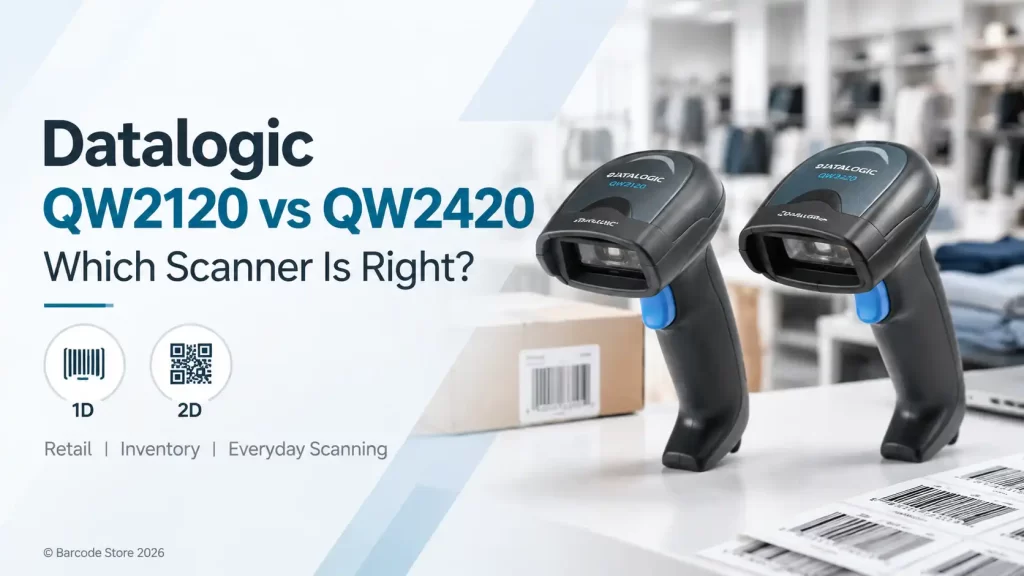
A checkout counter can look perfectly organised until a customer presents a barcode from a phone, a QR code on a delivery app, or a damaged label that a basic scanner struggles to read. That is usually where the decision between the Datalogic QW2120 vs QW2420 becomes clear.
For standard printed 1D retail barcodes, the Datalogic QW2120 is usually the sensible, cost-conscious choice. If staff need to scan QR codes, Data Matrix codes, or barcodes displayed on phone screens, the Datalogic QW2420 is the better fit. Buying a 1D scanner for a workflow that already uses 2D codes is a false saving.
Both are corded Datalogic barcode scanner options aimed at everyday counter work. The right model depends less on how busy the counter is and more on what barcode formats arrive at that counter.
Datalogic QW2120 vs QW2420 at a glance
| Consideration | Datalogic QW2120 | Datalogic QW2420 |
|---|---|---|
| Primary barcode capability | Designed for 1D barcodes | Designed to read 1D and 2D barcodes |
| Phone-screen codes | Not the appropriate choice for QR and other 2D codes | Suitable where 2D codes and phone screens are part of the workflow |
| Typical use | Traditional retail POS, stock look-up, printed membership cards | POS with QR codes, mobile vouchers, digital tickets or 2D product labels |
| Buying approach | Choose it when barcode use is clearly limited to 1D | Choose it when 2D is needed now or likely to be needed soon |
| Interface planning | Confirm the cable and host interface required for the POS or computer | Confirm the cable and host interface required for the POS or computer |
The distinction matters because a 1D scanner reads linear barcodes, such as the familiar horizontal bars on many retail products. A 2D scanner uses imaging technology to read both linear codes and two-dimensional symbols, including QR codes and Data Matrix codes.
For a small grocery, spare-parts counter, pharmacy-style retail environment, or back-office stock desk using only conventional printed product labels, a 1D scanner can do the job very well. For a Dubai café accepting digital loyalty vouchers, a shop receiving electronic return labels, or a service desk scanning codes from customers’ phones, a 2D scanner avoids an awkward manual-entry fallback.
When the QW2120 is the right choice
The Datalogic QW2120 suits businesses with a defined 1D barcode workflow. It is a practical option where staff scan standard printed EAN, UPC, Code 128, Code 39, or similar linear barcodes from product packaging, shelf labels, invoices, and membership cards.
It makes particular sense at a conventional POS counter where the software has no QR-based redemption process and suppliers provide standard retail barcodes. A business does not need to pay for 2D capability simply because 2D codes exist in the market.
Common QW2120 applications
- Retail tills scanning packaged goods with printed 1D barcodes
- Parts counters using labelled bins and stock cards
- Library, records, or document tracking based on linear barcode labels
- Basic inventory checks where labels are printed in-house as 1D codes
- Reception desks using printed visitor or membership cards
The main limit is straightforward: the QW2120 should not be selected for QR-code workflows. If a business may soon introduce mobile coupons, digital warranty cards, e-commerce return codes, or 2D labels for stock control, the apparent saving can disappear when the scanner has to be replaced.
When the QW2420 is worth the extra capability
The Datalogic QW2420 is the more flexible option because it handles 2D codes as well as ordinary 1D barcodes. That makes it a stronger choice for businesses where barcode formats are mixed or changing.
At a retail checkout, this can mean scanning a conventional product barcode one moment and a QR code from a customer’s mobile screen the next. In a warehouse office, it may mean scanning a courier’s 2D consignment code, then reading a carton label. The scanner is not automatically faster in every situation simply because it is a 2D scanner, but it removes a barcode-format restriction that can interrupt work.
It is also the more sensible purchase for new POS installations where the future workflow is not fully settled. Many UAE businesses add mobile promotions, electronic receipts, app-based loyalty, or QR-driven service processes over time. If any of those are likely, starting with the QW2420 is usually cleaner than standardising on a 1D-only device.
Choosing a scanner for a live POS workflow
Before ordering, list every barcode staff scan during a normal week, including codes on customer phones and courier documents. Barcode Store UAE can help compare the Datalogic QW2120 and Datalogic QW2420 against the actual barcode types used at the counter.
Scan performance in real counter work
Scanner performance is about more than the barcode symbology list. A clear, correctly printed label is easy for most suitable scanners. Problems usually begin with wrinkled packaging, reflective surfaces, faded thermal labels, low-contrast print, or codes presented at an awkward angle.
The QW2120 is intended for routine linear barcode reading, which is exactly what many retail counters need. The QW2420 adds imaging for 2D codes and screen-based codes. For staff, that means they can use one scanner across more barcode formats instead of keeping a separate device for mobile QR codes.
Neither model is a substitute for good label printing. If a carton label gets scuffed while moving through a warehouse or a direct thermal label sits in a hot delivery vehicle, barcode quality can deteriorate. A scanner may read a poor code occasionally, but the dependable fix is to improve the label material, print darkness, ribbon choice where thermal transfer is used, or barcode size.
Ergonomics and placement at the counter
For a corded scanner used repeatedly during a shift, comfort and working position deserve attention. Staff should be able to pick up the scanner, read a code, and return it without twisting the cable around the keyboard or receipt printer. A scanner stand can also make sense where hands-free presentation scanning is part of the routine, subject to the chosen configuration and setup.
At a compact retail counter in Dubai, cable routing is often the overlooked issue. The scanner cable needs enough length to reach the host device without being stretched, but not so much that it hangs into a customer area or catches under the till. Position the scanner so labels are presented naturally, rather than requiring staff to turn every product upside down.
The QW2120 and QW2420 are both more at home in indoor counter, reception, and light stockroom use than in rough outdoor handling. A busy loading bay, freezer environment, or forklift operation may call for a different class of scanner. It is better to identify that before ordering than to treat an entry-level counter scanner as a warehouse-rugged device.
Connectivity and cable options to check before purchase
A barcode scanner must communicate correctly with the POS terminal, PC, tablet setup, or software environment. The practical question is not simply whether the scanner has a cable; it is which host interface the installation needs.
Depending on the selected model and kit, cable/interface options may be available for common connections such as USB, keyboard wedge, or serial-style POS environments. Exact availability can vary by configuration, so purchasers should confirm the required interface before placing an order. A scanner with the wrong cable is not a minor inconvenience if the POS has already been installed.
Ask the IT or POS provider these questions
- What connection does the current POS terminal accept?
- Will the scanner be used as a keyboard-input device, or does the software require a specific serial or USB setup?
- Does the POS application need a prefix, suffix, Enter key after each scan, or other scanner programming?
- Will staff scan codes from mobile screens, including QR codes?
- Is a stand needed for the way products or documents are presented?
It is also sensible to test with the actual software where possible. A scanner can read the barcode correctly while the application still needs configuration to place the data in the right field or complete the transaction.
Which Datalogic scanner suits common UAE applications?
Standard retail checkout
Choose the QW2120 if every item has a conventional printed 1D product barcode and there is no need to scan QR codes. This is common in established retail setups with straightforward inventory and POS processes.
Retail with digital promotions or mobile loyalty
Choose the QW2420. It is the safer choice where a cashier may need to scan a customer’s QR voucher, app-generated code, or an electronic return reference alongside standard merchandise barcodes.
Hotel reception and service desks
The QW2420 often makes more sense where staff may receive codes on phones, booking documents, or digital passes. If the operation uses only printed linear barcode cards, the QW2120 can still be appropriate.
Stock rooms and small warehouse offices
Start with the labels already in use. A QW2120 works for printed 1D bin and carton labels. Select the QW2420 if suppliers, courier documents, or internal processes use 2D labels. For harsh warehouse tasks, assess the physical environment separately rather than choosing based on barcode capability alone.
Common buying mistakes
- Assuming a 1D scanner reads QR codes. It does not. QR code requirements point to the QW2420.
- Ordering before checking the POS interface. Confirm the host connection and cable requirement with the POS provider or IT team.
- Ignoring phone-screen scanning. A workflow may be mostly printed labels but still depend on occasional digital vouchers or returns.
- Blaming the scanner for poor labels. Faded, badly sized, glossy, creased, or low-contrast codes can create reading problems with any scanner.
- Buying for an imagined future rather than a likely one. The QW2420 is sensible for expected 2D use, but a stable 1D-only process does not need extra capability without a reason.
Frequently asked questions
Can the Datalogic QW2120 scan QR codes?
No. The QW2120 is a 1D scanner and should be selected for linear barcode workflows. A QR-code requirement points to the QW2420.
Can the Datalogic QW2420 scan normal retail barcodes?
Yes. A 2D scanner such as the QW2420 is intended to read standard 1D barcodes as well as supported 2D symbols, making it useful for mixed barcode environments.
Which is better for a supermarket or convenience store?
For product-only scanning with printed 1D barcodes, the QW2120 is usually enough. If the store scans digital coupons, QR loyalty codes, or phone-based returns, choose the QW2420.
Do these scanners work with POS software?
They can be configured for common host interfaces depending on the selected kit, but compatibility should be checked against the POS hardware and software requirements before purchase.
Is the QW2420 always the better choice?
No. It is the better choice for 2D and screen-based codes. For a stable 1D-only workflow, the QW2120 is often the more practical purchase.
The practical decision
Choose the Datalogic QW2120 when the business scans printed 1D barcodes and expects that workflow to remain unchanged. Choose the Datalogic QW2420 when QR codes, Data Matrix codes, mobile screens, or mixed barcode formats are part of the job. That is the decision rule most buyers need.
For a new POS rollout, the barcode formats matter more than the scanner’s appearance on the counter. Make a short list of every code staff need to scan, confirm the required cable/interface, and select the model that handles those codes without workarounds.
Need help matching the scanner to your setup?
Barcode Store UAE supplies Datalogic barcode scanners for POS and operational use across Dubai and the UAE. Share the barcode types, POS connection, and intended application, and the team can provide practical product guidance or a quotation without pushing unnecessary features.