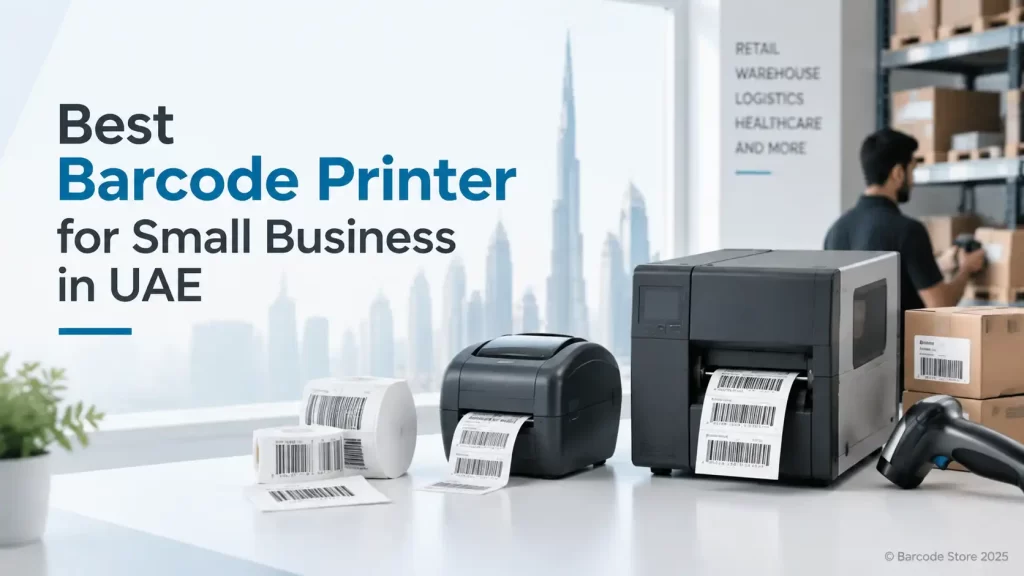
A barcode printer that is too basic can leave a business replacing faded labels within weeks. One that is too large can tie up budget and desk space for capacity that never gets used. For most buyers looking for a barcode printer for small business UAE, the sensible starting point is a desktop thermal printer matched to the label, print volume and working environment.
For a few hundred standard labels a day, a desktop unit is usually enough. Choose direct thermal for short-life labels such as courier stickers and retail price labels. Choose thermal transfer if labels need to survive heat, handling, moisture, cleaning products or long storage. That one decision often narrows the choice faster than comparing brand names.
Small businesses in Dubai, Abu Dhabi and the wider UAE also need to think about support materials. A good printer cannot compensate for the wrong label adhesive or ribbon. A carton label stored in an air-conditioned office has very different needs from an asset label used in a hot warehouse or a laundry tag exposed to repeated wash cycles.
Choosing a barcode printer for small business UAE operations
Start with the label that will actually go through the printer. Measure its width and height, note the core size if labels are already being purchased, and decide what information needs to fit on it. Product name, barcode, batch number, expiry date and Arabic or English text can quickly make a small label crowded.
Then estimate the busiest normal day, rather than the quietest one. A retailer printing 30 shelf labels in the morning has a different requirement from a parts store printing 400 bin labels during goods receiving. Desktop printers are practical workhorses, but they are not designed to replace an industrial printer on a continuous packing line.
| Buying question | What it points to | Typical example |
|---|---|---|
| How long must the label remain readable? | Direct thermal for short-term use; thermal transfer for durability | Courier label versus warehouse asset label |
| How many labels are printed each day? | Desktop for modest volumes; consider industrial equipment for sustained heavy output | Retail repricing versus a busy dispatch operation |
| How much detail is on the label? | 203 dpi for standard work; 300 dpi for small text and compact codes | Outer-carton label versus small jewellery or electronics label |
| Where will it sit? | Choose the connection method around the workstation and users | Single PC, shared warehouse station or mobile trolley |
Direct thermal or thermal transfer?
Both technologies use a heated printhead, but they produce the image in different ways. Direct thermal printing heats a coated label face directly. Thermal transfer uses heat to move ink from a ribbon onto the label. The right choice depends less on the printer itself than on what happens to the label after it is printed.
Direct thermal for short-life labels
Direct thermal is a straightforward choice for shipping labels, receipt-style labels, temporary visitor labels and retail labels that will be changed frequently. There is no ribbon to load, so routine operation is simpler and consumable handling is lower.
The limitation is durability. Direct thermal labels can darken or fade with heat, sunlight, friction and some chemical exposure. They are not the right answer for a pallet label that may sit in a warm loading area, a freezer application, or a label that needs to remain legible through months of handling.
Thermal transfer for labels that need to last
A thermal transfer barcode printer uses a ribbon, and that extra consumable is usually justified for stock labels, asset tags, product identification, manufacturing work-in-progress and many warehouse applications. With the correct label and ribbon pairing, print is more resistant to rubbing and environmental exposure than direct thermal output.
This is normally the better route for a Dubai warehouse, a workshop with dust and handling, or a business that needs a barcode to scan reliably long after the day it was printed. It also gives more material options, including synthetic label stocks suited to tougher applications.
Ribbon selection matters. Wax ribbons are commonly used for paper labels and ordinary indoor handling. Wax-resin and resin ribbons are used where better rub or chemical resistance is needed, depending on the label face material and application. A ribbon should not be picked by price alone; a poor match can produce a barcode that looks acceptable but scuffs during use.
203 dpi or 300 dpi print resolution
For most shipping, stock control and carton labels, 203 dpi is the practical choice. It produces clear standard barcodes and readable text at normal label sizes, with no reason to pay for finer resolution just because it is available.
Choose 300 dpi where labels are physically small or the design includes very small text, dense two-dimensional codes, fine product details or compact barcode symbols. Examples include small electronics labels, laboratory-style identification labels and tight retail packaging formats. Higher resolution does not make a large warehouse label better; it simply gives more detail where that detail is needed.
Barcode readability also depends on contrast, label surface, print darkness, printhead condition and correct sizing. A high-resolution printer cannot fix a barcode that has been squeezed too tightly onto a label or printed on unsuitable material.
Connectivity that works on the shop floor
USB is suitable when one person prints from one PC. It is simple, dependable and often all a small office or retail counter needs. For a printer beside a point-of-sale computer or a dedicated dispatch desk, USB is usually the least complicated option.
Ethernet suits a shared printer on a local network. It is often the better choice for a receiving area where more than one workstation may need to print labels. A wired connection also avoids some of the practical issues that can come with busy wireless networks in warehouses and free-zone facilities.
Wireless connectivity can be useful where cabling is awkward, such as a temporary packing bench or a mobile workstation. It should be chosen with a clear view of the site network and who will support it. A wireless printer that frequently loses connection is more frustrating than a USB printer with a properly planned workstation.
- Use USB for a single fixed user and a local PC.
- Use Ethernet for shared printing and fixed warehouse or office locations.
- Use wireless where the printer location needs flexibility and the network is stable.
What the SoluWise printer categories suit
A small business barcode printer is a sensible fit for everyday retail, office, stockroom and dispatch work where volumes are moderate and labels are not unusually wide. It is a good category to consider for startups that need to bring label printing in-house instead of waiting on pre-printed stock.
A desktop barcode printer UAE option suits businesses with limited counter or desk space that still need consistent barcode labels. It is appropriate for a pharmacy store room, retail back office, spare-parts counter or a small ecommerce packing desk. If production runs all day without meaningful breaks, an industrial printer may be a better fit.
A thermal label printer UAE option makes sense when the application has already pointed clearly to direct thermal or thermal transfer. For short-term despatch labels, direct thermal can keep operation simple. For inventory, assets and labels exposed to handling, a thermal transfer setup with the right ribbon is usually the more durable choice.
A barcode printer for startups should be selected with growth in mind, but not on imagined future volume. Buy for the next realistic stage of operation: the label sizes needed now, a connection method the team can use, and enough capacity for busy periods. Spending on a printer class that is never used is not a saving.
Brand considerations: Zebra, TSC, Honeywell and Brother
Zebra, TSC, Honeywell and Brother all have relevant desktop printing options, and the right brand depends on the particular workflow rather than a logo on the casing. Buyers should compare the available connectivity, print method, media compatibility, driver support and routine operating needs of the specific printer under consideration.
Zebra is often considered where established barcode printing workflows and broad application support matter. TSC can be a sensible option for businesses looking at practical desktop label printing requirements. Honeywell may fit operations already using related warehouse or data-capture equipment. Brother is familiar to many office users and can suit selected label-printing tasks. The final choice should be based on the labels and software being used, not simply a brand preference.
UAE purchasing checks that prevent problems later
Before ordering a barcode printer UAE businesses should confirm a few basic details with the supplier and internal IT or operations team. These checks avoid the common situation where the printer arrives but the labels, software or connection method do not match the intended job.
- Bring a sample of the current label, or provide exact dimensions and material requirements.
- State the expected labels per day and the busiest period, not only the monthly average.
- Confirm if labels must resist heat, moisture, freezer conditions, abrasion or regular cleaning.
- Check which software, ERP system, POS system or spreadsheet process will send print jobs.
- Decide who needs access to the printer and where it will physically sit.
- Ask about matching labels and ribbons, especially for thermal transfer applications.
Do not assume that any thermal barcode printer can print any label roll. Media width, label material, roll format and ribbon requirements need to suit the printer. Also, printing a barcode is separate from obtaining barcode numbers or product registration; a printer produces the symbol designed in the label software.
Common buying mistakes
Buying direct thermal for a long-life application
This is the most frequent mismatch. Direct thermal can look perfect on the day of printing, then lose readability after heat exposure or repeated handling. If the label is expected to remain on equipment, stock or cartons for months, thermal transfer deserves serious consideration.
Choosing 300 dpi without a reason
More resolution is useful for small labels and fine details, but it is not automatically better for standard stock labels. A 203 dpi printer is often the sensible, economical choice for normal barcode and text sizes.
Ignoring the full consumable setup
Printers, labels and ribbons work as a system. Selecting each part separately can lead to weak print, poor adhesion or premature printhead wear. Providing the actual application details to SoluWise makes it easier to specify compatible materials from the beginning.
Frequently asked questions
Which barcode printer is suitable for a small business in the UAE?
A desktop thermal printer is usually suitable for modest daily volumes. Direct thermal suits short-life labels, while thermal transfer is generally better for inventory, assets and labels that need to remain readable for longer.
Should a small business choose a direct thermal or thermal transfer printer?
Choose direct thermal for temporary labels such as courier and short-term retail labels. Choose thermal transfer if labels face heat, rubbing, moisture, warehouse handling or long storage.
Is 203 dpi good enough for barcode labels?
Yes, for most standard barcode labels, carton labels and stock labels. Use 300 dpi where labels are small or need fine text and dense barcode detail.
Can a desktop barcode printer handle warehouse labels?
It can handle modest warehouse volumes and suitable label sizes. A busy operation printing continuously across shifts may need an industrial-class printer instead.
Is Ethernet better than Wi-Fi for a barcode printer?
Ethernet is often preferable for a fixed shared warehouse or office printer because it is wired and predictable. Wi-Fi is useful where cabling is impractical and the local network is reliable.
Can the same printer use different label materials?
Often it can, but compatibility depends on the printer, label format and, for thermal transfer, the ribbon. Check the intended material before buying rather than assuming one roll type will suit every application.
A practical buying rule
Match the printer to the label’s working life first, then to print volume, label size and connection method. A compact 203 dpi direct thermal printer can be exactly right for a small dispatch desk. A 300 dpi thermal transfer setup is more appropriate where labels are small, detailed or expected to survive real handling.
If the label size, daily volume or material is uncertain, contact SoluWise with a sample label or a description of the application. We can suggest suitable small-business printer options and compatible labels or ribbons without pushing a larger machine than the job requires.